Backstory
I was added to a Discord server earlier this year by a couple of friends who are also software engineers. On Jan 22 2026, I saw this conversation in the #musics channel: 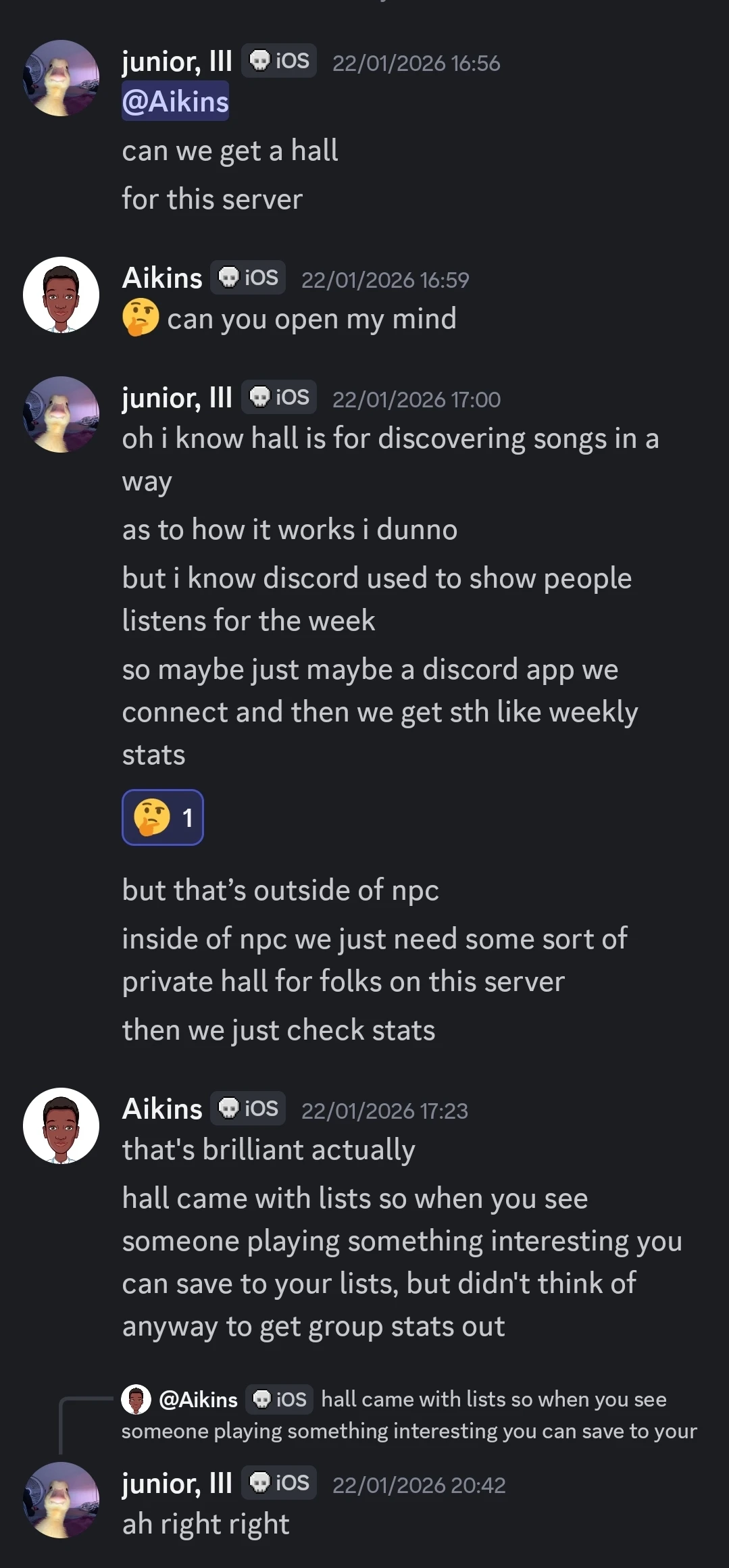
I thought, “Why the hell not? I should make a Discord bot for this.” The core functionality was simple:
- Allow users to connect their Spotify accounts using OAuth.
- Poll Spotify’s ‘Get Recently Played’ endpoint to get their recently played songs and store them.
- Process the stored data to present a nice summary of what they’ve been listening to.
- Send a weekly summary showing the top tracks and artists for the server.
I did some planning and spec’d out the application. I decided to use C# (my favorite language), .NET 10, and NetCord, a modern library for working with the Discord API. I got to work, created a Discord app, and implemented shells for the basic commands just to test and get familiar with the library:
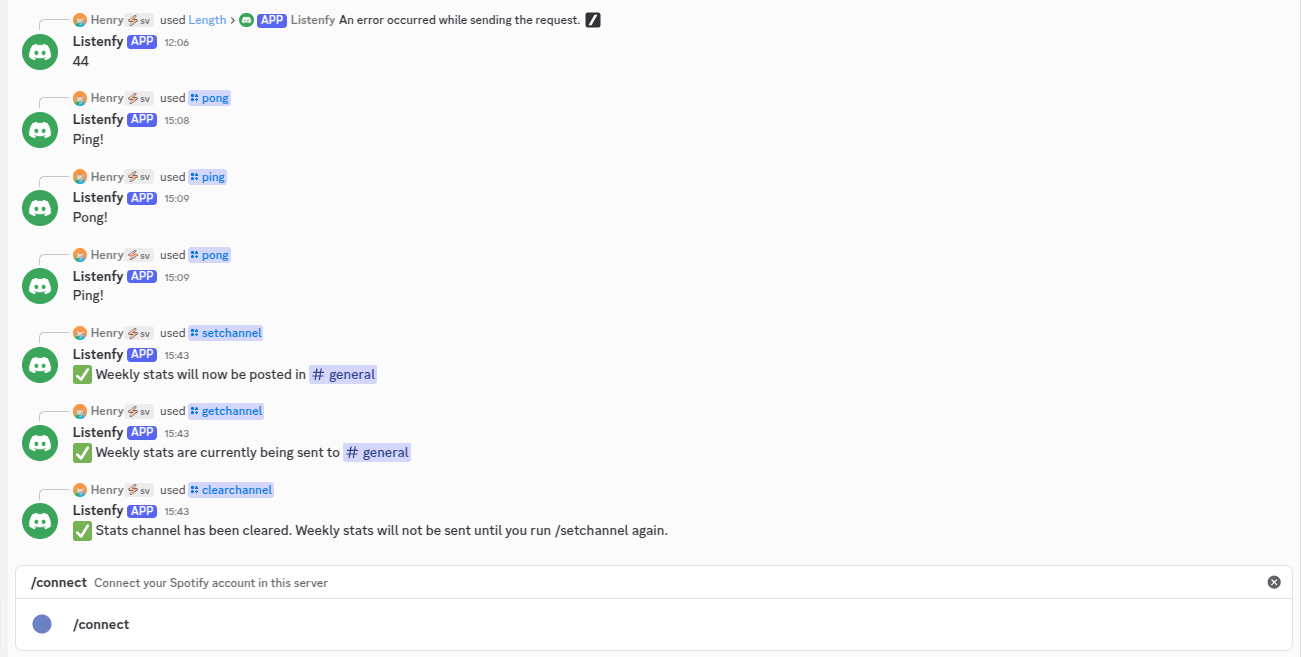
Next, I had to implement /connect and /disconnect, the authentication commands. Here, I hit my first roadblock:
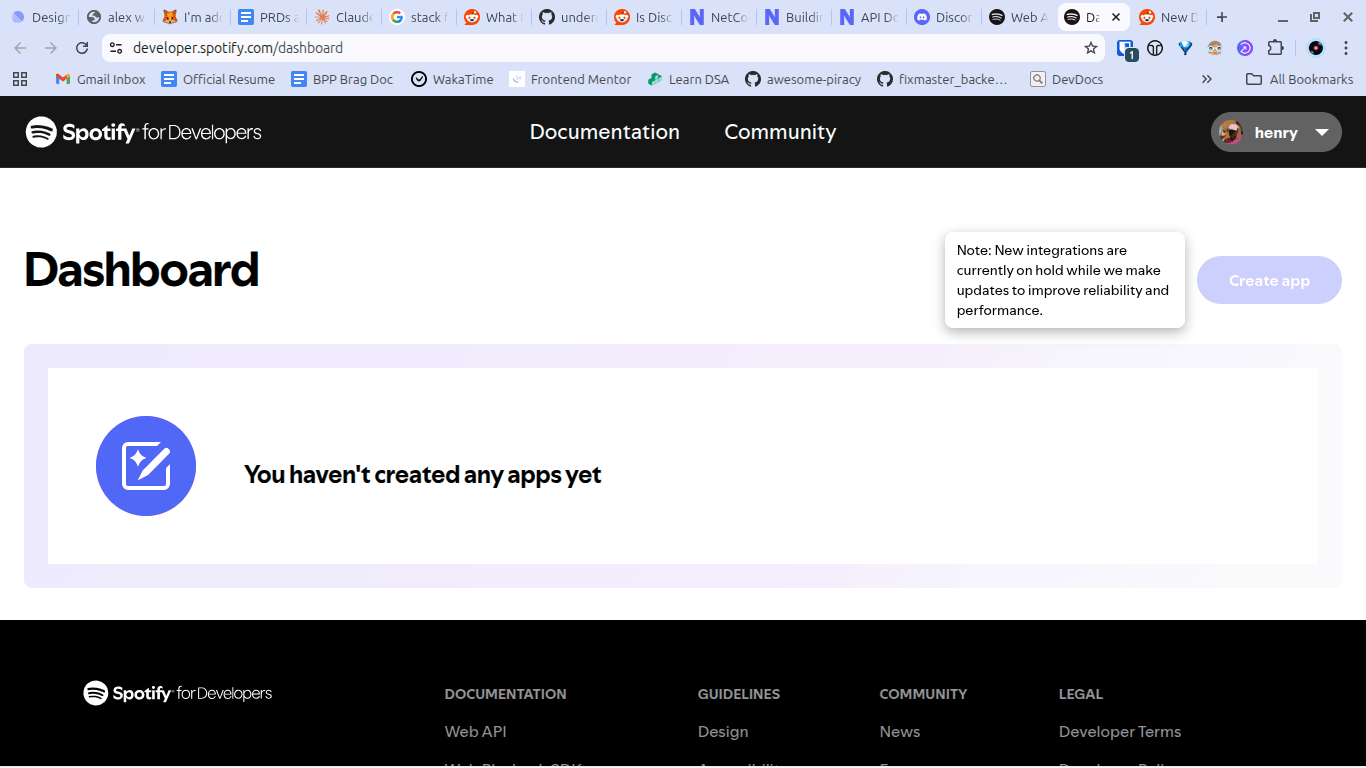
Spotify had blocked users from creating new applications a few weeks before I started building this. It seemed the project was dead on arrival. But, thankfully, one of the server members (DR DOOM!) had an unused application lying in wait. He shared the keys, and I got back in my chair.
I ran into a few more issues along the way.
The Issues
The ‘Get Recently Played’ endpoint
This endpoint accepts three query parameters, but we only care about two: before and after . Both are a unix timestamp in milliseconds. before returns all items before, but not including that timestamp. after returns all items after.
The response includes an array of items (named items), where each object within contains played_at: the exact date and time the track was played.
I assumed you could use this to recursively fetch a user’s listening history — like fetching all the tracks they had listened to during a week. By taking the earliest song in the items array, converting its timestamp to milliseconds, and passing it as before, I expected to get the next 50 songs played before that track.
Instead, I received an empty array. It turns out, Spotify only shows the last 50 songs a user listened to. If you need more historical data than that? Well, sorry man.
Integer Cast & Overflow
Speaking of polling the ‘Get Recently Played’ endpoint, my background job had a bug where it would consistently fetch the same 50 songs regardless of whether we had already stored them or not.
Here was the code used to call Spotify:
// metadata to track when last we called, so we use that as the timestamp on the next run
var metadata = user.SpotifyFetchMetadata;
if (metadata is null)
{
    metadata = new SpotifyFetchMetadata
    {
        SpotifyUserId = user.Id,
        LastFetchedAt = timeProvider.GetUtcNow().UtcDateTime,
        TracksFetchedInLastRun = 0,
    };

    dbContext.SpotifyFetchMetadata.Add(metadata);
    await dbContext.SaveChangesAsync();
    logger.LogInformation("Created new SpotifyFetchMetadata for user {SpotifyUserId}", user.SpotifyUserId);
}

// Calculate the 'after' timestamp (in Unix milliseconds) using LastFetchedAt
var afterTimestampMilliseconds = new DateTimeOffset(metadata.LastFetchedAt).ToUnixTimeMilliseconds();

// Spotify's API documentation says it accepts epoch time in milliseconds as an integer
// HERE IS THE BUG !!!
int? afterParam = (int)afterTimestampMilliseconds;

logger.LogDebug("Fetching tracks for user {SpotifyUserId} after timestamp {After}", user.SpotifyUserId, afterParam);

var result = await spotifyService.GetRecentlyPlayedTracks(user, afterParam);
if (result.IsFailure)
{
    logger.LogError(
        "Failed to fetch recently played tracks for user {SpotifyUserId}. Error: {Error}",
        user.SpotifyUserId,
        result.Error.Description
    );
    return;
}
The documentation for the endpoint mentioned after and before are integers:
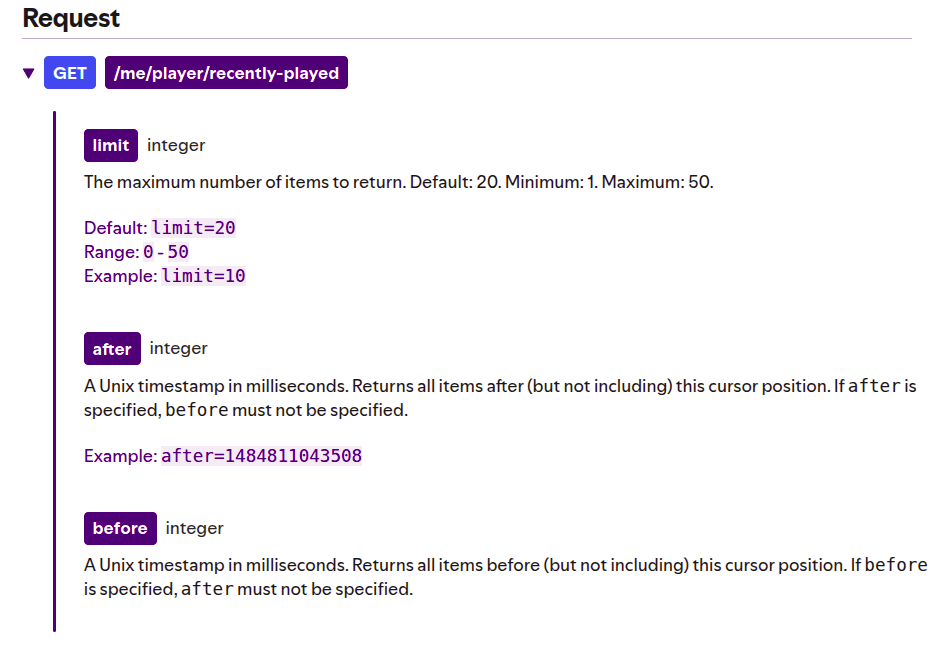
Thus, after converting the DateTime to milliseconds (which is stored as a 64-bit long in C#), I attempted to cast the value to a 32-bit int. This cast was shaving off the upper bits, resulting in a wildly incorrect date. For example, it would turn 1770642736974 (Monday, 9 February 2026) into 1116211022 (Monday, 16 May 2005).
Because I was passing a date from 2005 as the after parameter, Spotify would just resend the most recent songs we’d already stored.
To fix this, I simply removed the cast and passed the long directly:
var afterTimestampMilliseconds = new DateTimeOffset(metadata.LastFetchedAt).ToUnixTimeMilliseconds();
logger.LogDebug("Fetching tracks for user {SpotifyUserId} after timestamp {After}", user.SpotifyUserId, afterTimestampMilliseconds);

var result = await spotifyService.GetRecentlyPlayedTracks(user, afterTimestampMilliseconds);
The Authentication Pivot
Initially, the application used Spotify’s standard authorization code flow. The application generated an auth URL, and the user simply had to click “Agree”.
Then, Spotify released a devastating update to their developer portal.
Spotify limited developer applications to five users. FIVE. To get an extended quota, you had to be a registered organization with a minimum of 250k monthly active users. You can read more on the updates here.
Since my primary audience was a group of developers in a Discord server, I decided to pivot. Using the Authorization Code + PKCE flow, users could create their own Spotify Developer applications and authorize using their own Client IDs.
I built a simple frontend (using Svelte!) to make the onboarding process as painless as possible:
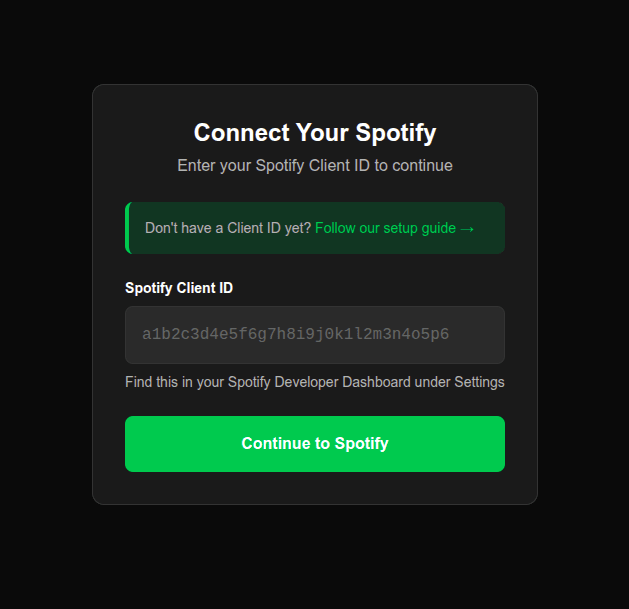
Now, users call the /connect command, receive a link to the web app, and follow a quick guide to complete authentication with their own credentials. While it adds a bit of friction, it allows anyone savvy enough to clone the application to bypass Spotify’s draconian API limits entirely.
Artist Name Tracking
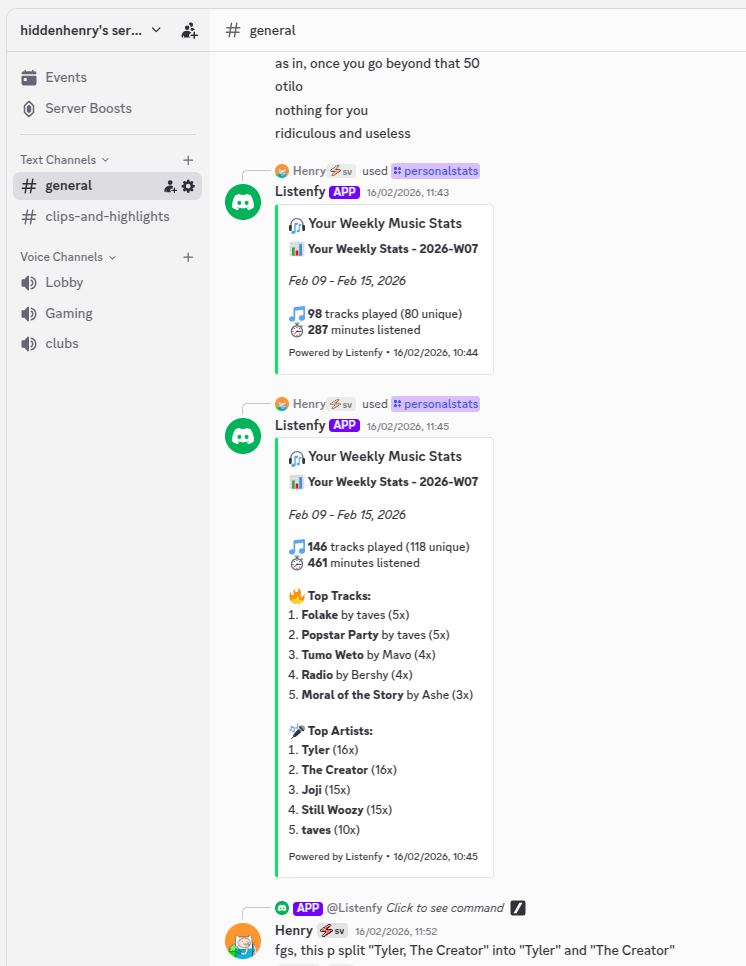
Ignore my music taste for a sec and take a look at the ‘Top Artists’ section. We’ve got:
- Tyler
- The Creator
If you’re familiar with the artist known as “Tyler, The Creator”, you should be able to guess the issue here. When you call the ‘Get Recently Played’ endpoint, each track contains an array of artists. Each artist has a name. In the polling job, we’d concatenate the names of all artists into a single string - separated by commas.
var listeningHistories = items.Select(item => new ListeningHistory
{
    // ...
    ArtistName = string.Join(", ", item.Track.Artists.Select(a => a.Name)),
    // ...
});
Then, when a user calls /personalstats, the application would parse the data and calculate which artists featured the most for the ‘Top Artists’ section.
// Compute top artists - split comma-separated artists and count unique plays
var topArtists = listeningHistory
    .SelectMany(lh => lh.ArtistName.Split(", ").Select(artist => artist.Trim()))
    .GroupBy(artist => artist)
    // ...
The problem was the .Split(", ") call, which assumed artists were always separated by a comma—a fatal flaw when dealing with “Tyler, The Creator”. The solution was to properly store artists as an array of JSON objects in PostgreSQL, mirroring Spotify’s structure.
var listeningHistories = items.Select(item => new ListeningHistory
{
    // ...
    Artists = item.Track.Artists.Select(a => new Artist { Id = a.Id, Name = a.Name }).ToList(),
    // ...
}).ToList();
Which makes querying for top artists much cleaner (and accurate):
var topArtists = listeningHistory
    .SelectMany(lh => lh.Artists)
    .GroupBy(artist => new { artist.Id, artist.Name })
    .Select(g => new TopArtist
    {
        Id = g.Key.Id,
        Name = g.Key.Name,
        PlayCount = g.Count(),
    })
    // ...
Now
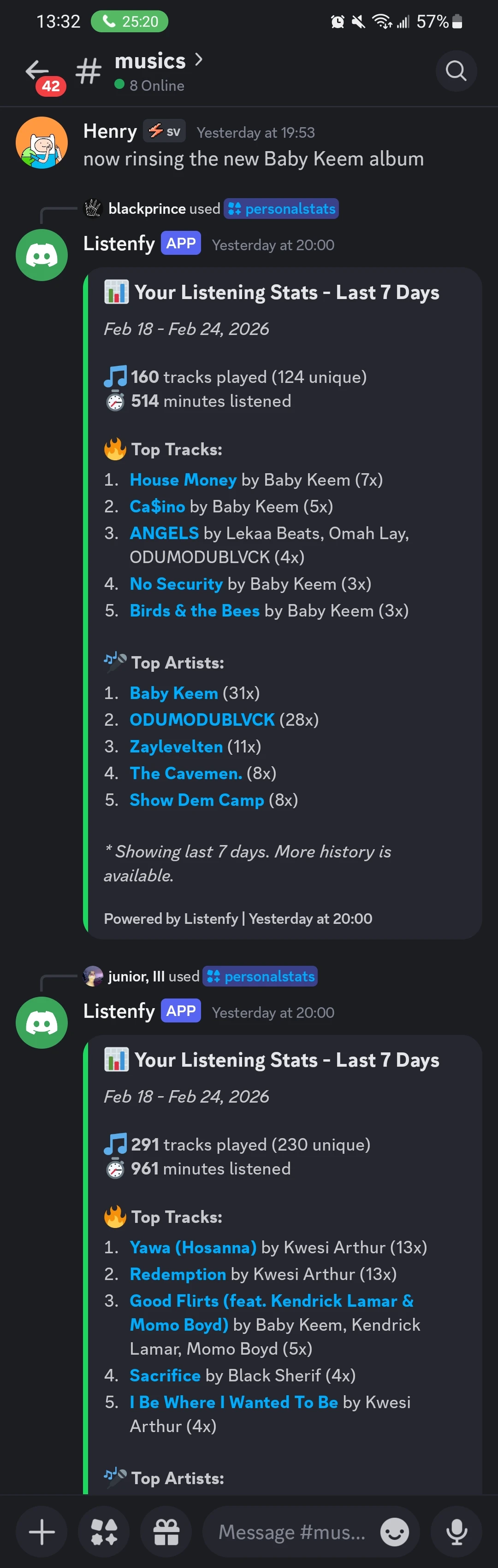
The bot has been running for almost two weeks now. It does its job, sends the weekly stats and doesn’t miss a beat. It was a fun project, and I learned a lot about Discord bots and the quirks of the Spotify API.
If you want to self-host Listenfy for your own Discord server, the code is fully open-source. You can also add the bot from my website.
Check out the repos here:
On to the next project.